
Theme Settings
Customizer Usage
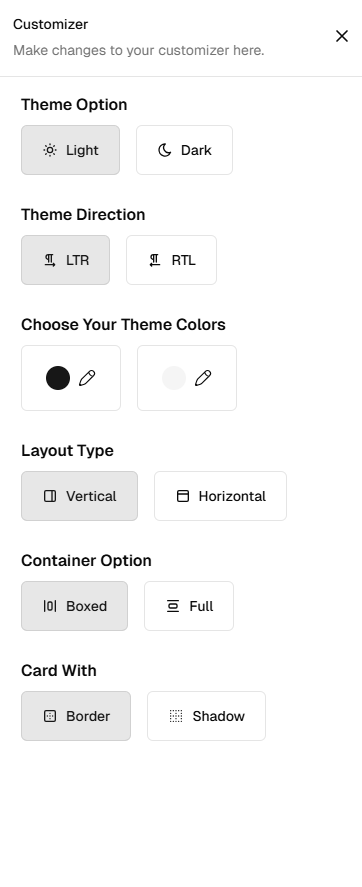
The Customizer enables you and your customers to modify the primary colors, themes, skins, layout options, and overall appearance of the template in real time.
While we recommend using this for enhanced customization, its use is entirely optional. Please review both scenarios carefully to understand its usage and benefits.
You must have below files in your project :
1. config.ts Path: app/context/config.ts
2. CustomizerContext.tsx Path: app/context/customizer-context/index.tsx
3. Customizer.tsx Path: app/(dashboard-layout)/layout/shared/customizer/index.tsx
1. How to set default settings ?
// ----------------------------------------------------
// File:app/context/config.ts
// ----------------------------------------------------

const config = {
  activeDir: 'ltr',
  activeMode: 'light', // This can be light or dark
  activeTheme: 'CUSTOM_THEME',
  SidebarWidth: 280,
  MiniSidebarWidth: 70,
  activeLayout: vertical,// This can be vertical or horizontal
  isLayout: 'boxed', // This can be full or boxed
  isCollapse: false, // to make sidebar Mini by default
  isSidebarHover: false,
  isHorizontal: false,
  isLanguage: 'en',
  isCardShadow: false,
  isBorderRadius: 12,
};
2. How to set right-to-left (RTL) settings ?
// ----------------------------------------------------
// File:app/context/config.ts
// ----------------------------------------------------

const config = {
  activeDir: 'ltr', // This can be ltr or rtl
  activeMode: 'light',
  activeTheme: 'CUSTOM_THEME',
  SidebarWidth: 280,
  MiniSidebarWidth: 70,
  activeLayout: vertical,
  isLayout: 'boxed',
  isCollapse: false,
  isSidebarHover: false,
  isHorizontal: false,
  isLanguage: 'en',
  isCardShadow: false,
  isBorderRadius: 12,
};
3. How to set Dark theme ?
// ----------------------------------------------------
// File:app/context/config.ts
// ----------------------------------------------------

const config = {
  activeDir: 'ltr',
  activeMode: 'light', // Change is here to dark
  activeTheme: 'CUSTOM_THEME',
  SidebarWidth: 280,
  MiniSidebarWidth: 70,
  activeLayout: vertical,
  isLayout: 'boxed',
  isCollapse: false,
  isSidebarHover: false,
  isHorizontal: false,
  isLanguage: 'en',
  isCardShadow: false,
  isBorderRadius: 12,
};
4. How to set Horizontal layout ?
// ----------------------------------------------------
// File:app/context/config.ts
// ----------------------------------------------------

const config = {
  activeDir: 'ltr',
  activeMode: 'light',
  activeTheme: 'CUSTOM_THEME',
  SidebarWidth: 280,
  MiniSidebarWidth: 70,
  activeLayout: vertical,
  isLayout: 'boxed',
  isCollapse: false,
  isSidebarHover: false,
  isHorizontal: false, // This can be vertical or horizontal
  isLanguage: 'en',
  isCardShadow: false,
  isBorderRadius: 12,
};
6. How to set Fullwidth layout ?
// ----------------------------------------------------
// File:app/context/config.ts
// ----------------------------------------------------

const config = {
  activeDir: 'ltr',
  activeMode: 'light',
  activeTheme: 'CUSTOM_THEME',
  SidebarWidth: 280,
  MiniSidebarWidth: 70,
  activeLayout: vertical,
  isLayout: 'boxed',
  isCollapse: false, // changes here
  isSidebarHover: false,
  isHorizontal: false,
  isLanguage: 'en',
  isCardShadow: false,
  isBorderRadius: 12,
};
7. How to set Boxed layout ?
// ----------------------------------------------------
// File:app/context/config.ts
// ----------------------------------------------------

const config = {
  activeDir: 'ltr',
  activeMode: 'light',
  activeTheme: 'CUSTOM_THEME',
  SidebarWidth: 280,
  MiniSidebarWidth: 70,
  activeLayout: vertical,
  isLayout: 'boxed',   // changes here to full
  isCollapse: false,
  isSidebarHover: false,
  isHorizontal: false,
  isLanguage: 'en',
  isCardShadow: false,
  isBorderRadius: 12,
};
8. How to set Minisidebar ?
// ----------------------------------------------------
// File:app/context/config.ts
// ----------------------------------------------------

const config = {
  activeDir: 'ltr',
  activeMode: 'light',
  activeTheme: 'CUSTOM_THEME',
  SidebarWidth: 280,
  MiniSidebarWidth: 70,
  activeLayout: vertical,
  isLayout: 'boxed',
  isCollapse: false,// changes here to true
  isSidebarHover: false,
  isHorizontal: false,
  isLanguage: 'en',
  isCardShadow: false,
  isBorderRadius: 12,
};
9. How to set card with shadow ?
// ----------------------------------------------------
// File:app/context/config.ts
// ----------------------------------------------------

const config = {
  activeDir: 'ltr',
  activeMode: 'light',
  activeTheme: 'CUSTOM_THEME',
  SidebarWidth: 280,
  MiniSidebarWidth: 70,
  activeLayout: vertical,
  isLayout: 'boxed',
  isCollapse: false,
  isSidebarHover: false,
  isHorizontal: false,
  isLanguage: 'en',
  isCardShadow: false,// changes here to true
  isBorderRadius: 12,
};
10. How to set card with border ?
// ----------------------------------------------------
// File:app/context/config.ts
// ----------------------------------------------------

const config = {
  activeDir: 'ltr',
  activeMode: 'light',
  activeTheme: 'CUSTOM_THEME',
  SidebarWidth: 280,
  MiniSidebarWidth: 70,
  activeLayout: vertical,
  isLayout: 'boxed',
  isCollapse: false,
  isSidebarHover: false,
  isHorizontal: false,
  isLanguage: 'en',
  isCardShadow: true,// changes here to false
  isBorderRadius: 12,
};
11. How to set theme border radius ?
// ----------------------------------------------------
// File:app/context/config.ts
// ----------------------------------------------------

const config = {
  activeDir: 'ltr',
  activeMode: 'light',
  activeTheme: 'CUSTOM_THEME',
  SidebarWidth: 280,
  MiniSidebarWidth: 70,
  activeLayout: vertical,
  isLayout: 'boxed',
  isCollapse: false,
  isSidebarHover: false,
  isHorizontal: false,
  isLanguage: 'en',
  isCardShadow: true,
  isBorderRadius: 12,// changes here
};